relational database
What is a relational database?
A relational database is a collection of information that organizes data points with defined relationships for easy access. In the relational database model, the data structures -- including data tables, indexes and views -- remain separate from the physical storage structures, enabling database administrators to edit the physical data storage without affecting the logical data structure.
In the enterprise, relational databases are used to organize data and identify relationships between key data points. They make it easy to sort and find information, which helps organizations make business decisions more efficiently and minimize costs. They work well with structured data.
How does a relational database work?
The data tables used in a relational database store information about related objects. Each row holds a record with a unique identifier -- known as a key -- and each column contains the attributes of the data. Each record assigns a value to each feature, making relationships between data points easy to identify.
The standard user and application program interface (API) of a relational database is the Structured Query Language. SQL code statements are used both for interactive queries for information from a relational database and for gathering data for reports. Defined data integrity rules must be followed to ensure the relational database is accurate and accessible.
What is the structure of a relational database model?
E. F. Codd, then a young programmer at IBM, invented the relational database in 1970. In his paper, "A Relational Model of Data for Large Shared Data Banks," Codd proposed shifting from storing data in hierarchical or navigational structures to organizing data in tables containing rows and columns.
Each table, sometimes called a relation, in a relational database contains one or more data categories in columns or attributes. Each row, also called a record or tuple, contains a unique instance of data -- or key -- for the categories defined by the columns. Each table has a unique primary key that identifies the information in a table. The relationship between tables can be set via the use of foreign keys -- a field in a table that links to the primary key of another table.
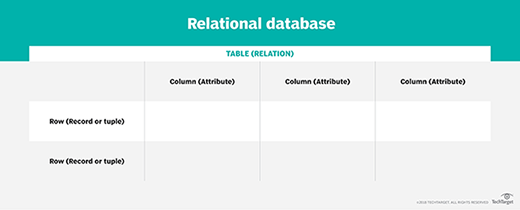
For example, a typical business order entry database would include a table that describes a customer with columns for name, address, phone number and so forth. Another table would describe an order, including information like the product, customer, date and sales price.
A user can get a database report showing the data they need. For example, a branch office manager might want a report on all customers that bought products after a certain date. A financial services manager in the same company could, from the same tables, obtain a report on accounts that need to be paid.
When creating a relational database, users define the domain of possible values in a data column and constraints that may apply to that data value. For example, a domain of possible customers could allow up to 10 possible customer names, but it is limited in one table to allowing only three of these customer names to be specifiable.
Two constraints relate to data integrity and the primary and foreign keys:
- Entity integrity ensures that the primary key in a table is unique and the value is not set to null.
- Referential integrity requires that every value in a foreign key column will be found in the primary key of the table from which it originated.
In addition, relational databases possess physical data independence. This refers to a system's capacity to make changes to the inner schema without altering the external schemas or application programs. Inner schema alterations may include the following:
- the use of new storage devices;
- modifying indexes;
- changing from a specific access method to a different one;
- using different data structures; and
- using various storage structures or file organizations.
Logical data independence is a system's ability to manage the conceptual schema without altering the external schema or application programs. Conceptual schema alterations may include the addition or deletion of new relationships, entities or attributes without altering existing external schemas or rewriting application programs.
What are the types of databases?
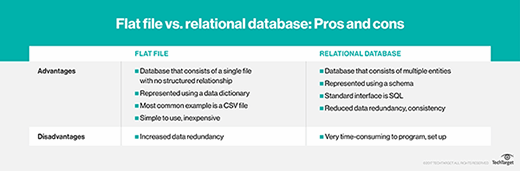
There are several database categories, from basic flat files that aren't relational to NoSQL and newer graph databases that are considered even more relational than standard relational databases. Some database types include the following:
Flat file database. These databases consist of a single table of data that has no interrelation -- typically text files. This type of file enables users to specify data attributes, such as columns and data types.
NoSQL database. This type of database is an alternative that's especially useful for large, distributed data sets. NoSQL databases support a variety of data models, including key-value, document, columnar and graph formats.
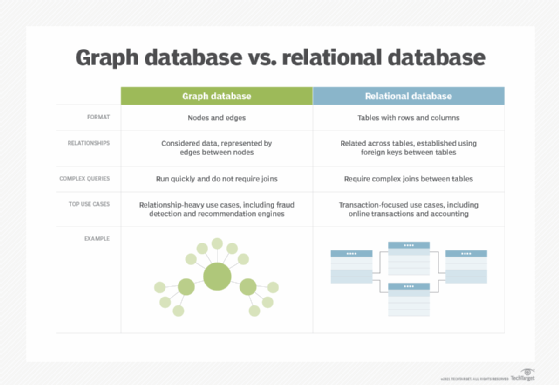
Graph database. Expanding beyond traditional column- and row-based relational data models; this NoSQL database uses nodes and edges that represent connections between data relationships and can discover new relationships between the data. Graph databases are more sophisticated than relational databases. They are used for fraud detection or web recommendation engines.
Object relational database (ORD). An ORD is composed of both a relational database management system (RDBMS) and an object-oriented database management system (OODBMS). It contains characteristics of both the RDBMS and OODBMS models. A traditional database is used to store the data. It is then accessed and manipulated using queries written in a query language, such as SQL. Therefore, the basic approach of an ORD is based on a relational database.
However, an ORD can also be considered object storage, particularly for software written in the object-oriented programming language, thus pulling on object-oriented characteristics. In this situation, APIs are used in the storage and retrieval of data.
What are the advantages of relational databases?
The key advantages of relational databases include the following:
- Categorizing data. Database administrators can easily categorize and store data in a relational database that can then be queried and filtered to extract information for reports. Relational databases are also easy to extend and aren't reliant on physical organization. After the original database creation, a new data category can be added without having to modify the existing applications.
- Accuracy. Data is stored just once, eliminating data deduplication in storage procedures.
- Ease of use. Complex queries are easy for users to carry out with SQL, the main query language used with relational databases.
- Collaboration. Multiple users can access the same database.
- Security. Direct access to data in tables within an RDBMS can be limited to specific users.
What are the disadvantages of relational databases?
The disadvantages of relational databases include the following:
- Structure. Relational databases require a lot of structure and a certain level of planning because columns must be defined and data needs to fit correctly into somewhat rigid categories. The structure is good in some situations, but it creates issues related to the other drawbacks, such as maintenance and lack of flexibility and scalability.
- Maintenance issues. Developers and other personnel responsible for the database must spend time managing and optimizing the database as data gets added to it.
- Inflexibility. Relational databases are not ideal for handling large quantities of unstructured data. Data that is largely qualitative, not easily defined or dynamic is not optimal for relational databases, because as the data changes or evolves, the schema must evolve with it, which takes time.
- Lack of scalability. Relational databases do not horizontally scale well across physical storage structures with multiple servers. It is difficult to handle relational databases across multiple servers because as a data set gets larger and more distributed, the structure is disrupted, and the use of multiple servers has effects on performance -- such as application response times -- and availability.
Examples of relational databases
Standard relational databases enable users to manage predefined data relationships across multiple databases. Popular examples of standard relational databases include Microsoft SQL Server, Oracle Database, MySQL and IBM DB2.
Cloud-based relational databases, or database as a service, are also widely used because they enable companies to outsource database maintenance, patching and infrastructure support requirements. Cloud relational databases include Amazon Relational Database Service, Google Cloud SQL, IBM DB2 on Cloud, SQL Azure and Oracle Cloud.
What are the differences between relational databases, non-relational databases and NoSQL?
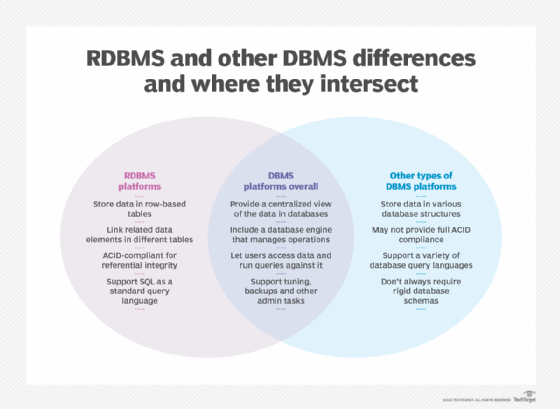
The most important difference between relational database systems and non-relational database systems is that relational databases are normalized. That is, they store data in a tabular form, arranged in a table with rows and columns. A non-relational database stores data as files.
Other differences include the following:
- Use of primary keys. Relational database tables each have a primary key identifier. In a non-relational database, data is normally stored in hierarchical or navigational form, without the use of primary keys.
- Data values relationships. Since data in a relational database is stored in tables, the relationship between these data values is stored as well. Since a non-relational database stores data as files, there is no relationship between the data values.
- Integrity constraints. In a relational database, the integrity constraints are any constraint that ensures database integrity. They are defined for the purpose of atomicity, consistency, isolation and durability, or ACID. Non-relational databases do not use integrity constraints.
- Structured vs. unstructured data. Relational databases work well for structured data that conforms to a predefined data model and doesn't change much. Non-relational databases are better for unstructured data, which doesn't conform to a predefined data model and can't be stored in an RDBMS. Examples of unstructured data include text, emails, photos, videos and web pages.
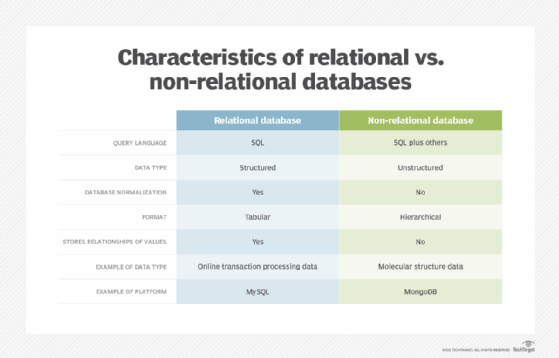
Non-relational databases are also called NoSQL databases. The terms are used interchangeably, but there are differences.
SQL is the query language that is used with relational databases. Relational databases and their management systems almost always use SQL as their underlying query language. NoSQL, or not only SQL, databases use SQL and other query languages. For example, the NoSQL database management program MongoDB uses JSON-like documents to store and organize data. (Technically, it uses a variant of JSON call BSON, or binary JSON.)
Referring to databases as non-relational vs. relational categorizes them based on their architecture, and referring to them as SQL vs. NoSQL categorizes them based on the query language, whether it is solely SQL or not only SQL. Often, a relational database can be referred to as a SQL database, as many of them use SQL, and non-relational databases can be referred to as NoSQL databases. NoSQL and non-relational databases work well with more fluid data models, such as in engineering parts and molecular modeling, where the data is always changing.
Both relational and non-relational database platforms have their drawbacks. NewSQL databases seek to provide the benefits of both types, by offering the data integrity and application access control that relational databases offer and the horizontal scalability that non-relational or NoSQL platforms provide.
Choosing the right database
Relational databases work for structured data with defined relationships that can be organized in a tabular format. However, there is a lot more to selecting the right database architecture than just choosing between relational and non-relational. The type of data and application being used or developed are key factors to consider. Learn some of the other factors to consider when choosing a database model for an enterprise application.
Certain initiatives require specific considerations when choosing database software. For instance, with IoT initiatives, SQL vs. NoSQL is an issue, as is static vs. streaming. Find out what to assess when selecting a database for an IoT project.







