Home > Oracle News > Fast Guide: PL/SQL
Oracle News:
EMAIL THIS LICENSING & REPRINTS

Fast Guide: PL/SQL

By Robyn Lorusso, Editor, SearchOracle.com
07 Jun 2004 | SearchOracle.com

Digg This!    StumbleUpon Toolbar StumbleUpon    Bookmark with Delicious Del.icio.us   

Unique to Oracle, PL/SQL is the procedural language extension to the structured query language (SQL). It combines a database language with a procedural programming language, which is built on a basic unit called a block. By compiling and storing executable blocks, Oracle can process the PL/SQL quickly and easily.

That's just a quick overview of PL/SQL -- now for the nitty-gritty. This fast guide links you to PL/SQL tips, expert responses and resources on SearchOracle.com and from around the Web. It can help both newbies and veterans become better acquainted with the language and hone their developer skills.

TABLE OF CONTENTS
   What is PL/SQL?
   PL/SQL basics
   Language elements
   Details on Oracle datatypes
   Procedures, functions and packages
   Tips on triggers
   Working with stored procedures
   PL/SQL tuning
   Dynamic SQL in PL/SQL
   Additional PL/SQL resources


What is PL/SQL?
[ Return to Table of Contents ]

The following explanation of PL/SQL is excerpted from "Learning Oracle PL/SQL" by Bill Pribyl & Steven Feuerstein.

"Structured Query Language is a language based on set theory, so it is all about manipulating sets of data. SQL consists of a relatively small number of main commands such as SELECT, INSERT, CREATE, and GRANT; in fact, each statement accomplishes what might take hundreds of lines of procedural code to accomplish. That's one reason SQL-based databases are so widely used. The big joke about the name "SQL" is that it is not really structured, is not just for queries, and (some argue) is not even a real language. Nevertheless, it's the closest thing there is to a lingua franca for relational databases such as Oracle's database server, IBM's DB2 and Microsoft's SQL Server.

"A language extension is a set of features that somehow enhance an existing language. This phrase might imply, incorrectly, that PL/SQL is a special version of SQL. That isn't the case, however. PL/SQL is a programming language in its own right; it has its own syntax, its own rules, and its own compiler. You can write PL/SQL programs with or without any SQL statements. Some authors assert that PL/SQL is a superset of SQL, but that's a bit of an overstatement, because only the most common SQL statements can be used easily in a PL/SQL program.

"PL/SQL, then, is a language that is closely related to SQL, but one that allows you to write programs as an ordered series of statements. Or, if you want a definition of PL/SQL that befits a programmer:

    "PL/SQL is a procedural (Algol-like) language with support for named program units and packages; much of its syntax is borrowed from Ada, and from Oracle's SQL it derives its datatype space and many built-in functions."

See the following section for additional definitions and explanations of PL/SQL.


PL/SQL basics
[ Return to Table of Contents ]

PL/SQL offers a variety of benefits to Oracle DBMS users, including the ability to modularize program development, support for error handling, portability across platforms and much more. The following resources will help newbies learn more about the benefits and uses of PL/SQL.

  • PL/SQL definition
  • PL/SQL: What, when, and where
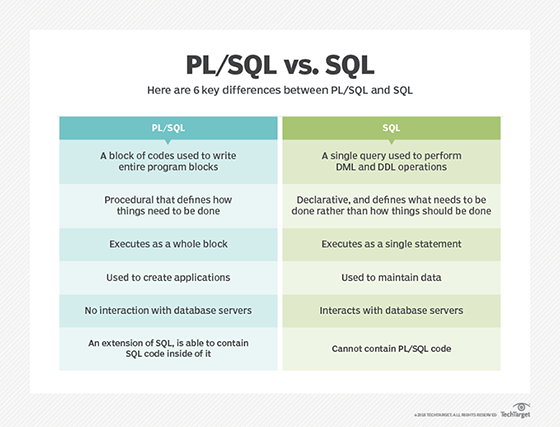
  • SQL vs. PL/SQL
  • Using Oracle PL/SQL
  • Learning Oracle basics
  • Introduction to Oracle design
  • PL/SQL control structures: Best practices
  • Application development: PL/SQL, Java or C++?
  • Moving data: Pro*C, SQL or PL/SQL?
  • Why Oracle wins in a comparison with SQL Server
  • Ask PL/SQL experts Azim Fahmi and Frank Kulash for advice
  • OTN's PL/SQL center
  • What's new in PL/SQL in Oracle10g?
  • Oracle FAQ's PL/SQL FAQ
  • Best Web Links: PL/SQL
  • Fast Guide: Solving common Oracle errors
  • Crash Course: Oracle basics


    Language features
    [ Return to Table of Contents ]

    PL/SQL language elements, as noted in the "PL/SQL User's Guide and Reference," include comments, assignments, statements, procedures, functions, packages, expressions, logical operators, strings, variable names, declarations, types, loop, data functions, exceptions, objects, pipe messages, records, triggers and alerts. Here you'll find tips and advice pertaining to various PL/SQL elements.

    Further down the page, you will find more extensive information on procedures, functions and packages, triggers and stored procedures.

  • PL/SQL control structures: Best practices
  • CASE and PL/SQL
  • DECODE vs. CASE
  • Assignment operators explained
  • Substitution variables
  • Calling variable name packages
  • Processing regular expressions
  • Processing a delimited string
  • Splitting a string
  • Performing string searches on CLOB files
  • Different types of pragma
  • Scripts for dates, days and holidays
  • Dates and DECODE
  • Oracle alert log miner
  • Exception handling
  • Catching PL/SQL error code


    Details on Oracle datatypes
    [ Return to Table of Contents ]

    PL/SQL datatypes, as noted in the "PL/SQL User's Guide and Reference," include numbers, characters, large objects, boolean, date, time and intervals. The following tips and expert advice will offer you methods for working with various datatypes.

    BLOBs and CLOBs

  • BLOB definition
  • Query to find size of BLOB objects
  • Updating a BLOB column without BFILE/create directory options
  • Converting LONGRAW to BLOB
  • Viewing data stored in CLOB
  • Searching on CLOB columns

    CHAR, VARCHAR, VARCHAR2 and LONG RAW

  • VARCHAR2 vs. VARCHAR
  • More on VARCHAR2 vs. VARCHAR
  • VARCHAR2 vs. VARCHAR vs. CHAR
  • Getting the length of a LONG data type and concatenating LONG with VARCHAR2
  • Loading LONG RAW data
  • Converting LONGRAW to BLOB
  • Getting number of bytes in LONG RAW column

    DATE and TIME

  • Scripts for dates, days and holidays
  • Verifying date columns, sending e-mail with PL/SQL
  • Coding for unique calendar year
  • Transfering a table on date change
  • How to pass a date to a stored procedure in Oracle9i
  • Mapping time intervals with Oracle's date arithmetic
  • Adding time using PL/SQL
  • Calculating time differences, excluding weekends

    REF CURSOR

  • REF cursors explained
  • Returning number of rows to a REF CURSOR
  • Closing ref cursor after it's used in a Java program
  • Number of open cursors increasing


    Procedures, functions and packages
    [ Return to Table of Contents ]

    Through a variety of examples, this section can help you better understand how to use, write and build procedures, functions and packages with PL/SQL.

  • PL/SQL control structures: Best practices
  • List the KEPT status for PL/SQL objects in your database
  • Viewing all objects for a specific user
  • Compile all invalid objects
  • Calling a PL/SQL procedure
  • Procedure to create synonyms
  • Displaying the output of PL/SQL procedures
  • Returning more than one value from PL/SQL procedure
  • How to return a set of records from a PL/SQL procedure
  • Trouble with TRUNCATE in a procedure
  • Running SQL*Loader from within PL/SQL procedure
  • Importing/exporting wrapped PL/SQL procedures
  • PL/SQL UTL_SMTP procedure to send e-mail
  • Finding rows with non-printable characters in them (block)
  • Calling a PL/SQL procedure or function from a Java program
  • When to use functions and stored procedures
  • Getting the last inserted sequence value
  • Calling variable name packages
  • Package to search on CLOB columns
  • Package to change foreign keys
  • Pinning vs. caching


    Tips on triggers
    [ Return to Table of Contents ]

    A trigger is a set of statements that automatically "fires off" an action when a specific operation, such as changing data in a table, occurs. They are used to preserve data integrity by consistently checking on or changing data. Here is a list of tips and tricks to help you work with PL/SQL triggers.

  • Trigger definition
  • Disabling and enabling triggers
  • Getting the table name within a trigger
  • Passing parameters to a trigger
  • Trigger to assign rollback segment to export backup
  • Trigger to send automatic e-mail notification of expiring passwords
  • Trigger running a shell process on Unix without pipes
  • How to use Resumable Space Allocation in Oracle9i
  • Using a trigger to replicate 10,000 records daily to SQL Server
  • Non-trigger-based solutions for replicating data to SQL Server
  • Passing new and old in a trigger to a Java stored procedure
  • Trigger on a materialized view (snapshot) table
  • Executing a VB procedure from an Oracle trigger
  • Mutating tables and AUTOCOMMIT
  • How to avoid 'mutating table' errors
  • Assigning new values to entire record in one line
  • Resolving the ORA-06508 error from trigger
  • List the KEPT status for PL/SQL objects in your database
  • Compile all invalid objects
  • Trigger or stored procedure for table transfer?
  • Chapter download: Programming Oracle triggers and stored procedures


    Working with stored procedures
    [ Return to Table of Contents ]

    A stored procedure is a set of statements with an assigned name that's stored in the database in compiled form so that it can be shared by a number of programs. Stored procedures are helpful in controlling access to data, preserving data integrity and improving productivity. Here are tips and expert advice for working with PL/SQL stored procedures.

  • Stored procedure definition
  • Why use stored procedures?
  • Stored procedure vs. embedded SQL
  • Trigger or stored procedure for table transfer?
  • When to use functions and stored procedures
  • Executing stored procedures in 9i from SQL Server
  • Time-based stored procedure to check table and update old records
  • Coding stored procedures in Java
  • Error when calling stored procedure
  • Stored procedure to change schema
  • Stored procedure to update across a firewall
  • Implement timeout
  • Insert in a cursor takes hours to complete
  • Accessing non-Oracle databases using stored procedures and JDBC
  • Calling a stored procedure from a trigger
  • Outputting rows to flat file, granting EXECUTE to user
  • Returning rows through stored procedure
  • Creating set of rows through 8i stored procedure
  • How to find which stored procedure is currently running
  • Chapter download: Programming Oracle triggers and stored procedures


    PL/SQL tuning
    [
    Return to Table of Contents ]

    Simply tweaking your PL/SQL code may not help identify or eliminate bottlenecks. Here are a few methods for tuning your PL/SQL.

  • Tuning SQL and PL/SQL
  • Improving PL/SQL performance by using collections
  • Getting information about execution times
  • Improving the processing time of a stored procedure
  • Retrieval time for LONGRAW images is slow
  • Oracle PL/SQL built for speed
  • White paper: Oracle SQL and PL/SQL development and maintenance concepts
  • Best Web Links: performance tuning


    Dynamic SQL in PL/SQL
    [
    Return to Table of Contents ]

    Dynamic SQL facilitates the automatic generation and execution of program statements. It is useful for building ad hoc query systems and executing DDL inside PL/SQL, and it is often needed in Web-based applications. Here you'll find advice for working with dynamic SQL.

  • Dynamic SQL definition
  • The curse and blessings of dynamic SQL
  • Dynamic SQL
  • Using dynamic SQL
  • An example of dynamic SQL in PL/SQL
  • Creating tables in PL/SQL
  • Changing schema
  • Using dblink when defining cursor in PL/SQL routine
  • Chapter excerpt: "Oracle PL/SQL programming guide to Oracle8i features"
  • Chapter excerpt: "Dynamic SQL"


    Additional PL/SQL resources
    [
    Return to Table of Contents ]

    Look into these resources for answers to your more specific PL/SQL questions.

  • Ask PL/SQL experts Azim Fahmi and Frank Kulash for advice
  • OTN's PL/SQL center
  • What's new in PL/SQL in Oracle10g?
  • Oracle FAQ's PL/SQL FAQ
  • Best Web Links: PL/SQL
  • Tips: Oracle database administration
  • Chapter excerpt: "Learning Oracle PL/SQL"
  • Oracle FAQ's list of Oracle PL/SQL books
  • Book: "Mastering Oracle PL/SQL"
  • Book: "Oracle PL/SQL by example," 3/E
  • Book: "Oracle SQL and introductory PL/SQL"
  • Book: "Oracle9i Developer: PL/SQL programming"
  • Book: "Oracle PL/SQL language pocket reference," 2E


    Digg This!    StumbleUpon Toolbar StumbleUpon    Bookmark with Delicious Del.icio.us   


  • HomeNewsTopicsTipsAsk the ExpertsMultimediaWhite PapersProductsBlogs
    About Us  |  Contact Us  |  For Advertisers  |  For Business Partners  |  Site Index  |  RSS
    SEARCH 
    TechTarget provides enterprise IT professionals with the information they need to perform their jobs - from developing strategy, to making cost-effective IT purchase decisions and managing their organizations' IT projects - with its network of technology-specific Web sites, events and magazines.

    TechTarget Corporate Web Site  |  Media Kits  |  Reprints  |  Site Map


    All Rights Reserved, Copyright 2003 - 2008, TechTarget | Read our Privacy Policy
      TechTarget - The IT Media ROI Experts