List the types of SQL subqueries
In this chapter, learn about the three broad divisions of a subquery in SQL: Single-row, multiple-row and correlated subqueries.
OCA Oracle Database 11g: SQL Fundamentals I Exam Guide
Chapter 8: Using Subqueries to Solve Problems
 |
|
 |
|
|
|
There are three broad types of a subquery in SQL. This chapter from OCA Oracle Database 11g: SQL Fundamentals I Exam Guide explains differences between a single-row subquery, multiple-row subquery and correlated subquery . After reading this chapter, you should be able to list these subqueries and differentiate between each type.
OCA Oracle Database 11g: SQL Fundamentals I Exam Guide, Chapter 8
Table of contents:
 Define SQL subqueries
Using subqueries in SQL
List the types of SQL subqueries
Writing single-row and multiple-row subqueries
There are three broad divisions of subquery:
- Single-row subqueries
- Multiple-row subqueries
- Correlated subqueries
Single- and Multiple-Row Subqueries
The single-row subquery returns one row. A special case is the scalar subquery, which returns a single row with one column. Scalar subqueries are acceptable (and often very useful) in virtually any situation where you could use a literal value, a constant, or an expression. Multiple-row subqueries return sets of rows. These queries are commonly used to generate result sets that will be passed to a DML or SELECT statement for further processing. Both single-row and multiple-row subqueries will be evaluated once, before the parent query is run. Single- and multiple-row subqueries can be used in the WHERE and HAVING clauses of the parent query, but there are restrictions on the legal comparison operators. If the comparison operator is any of the ones in the following table, the subquery must be a single-row subquery:
| Symbol | Meaning |
|---|---|
| = | equal |
| > | greater than |
| >= | greater than or equal |
| <</td> | less than |
| <= | less than or equal |
| <> | not equal |
| != | not equal |
If any of the operators in the preceding table are used with a subquery that returns more than one row, the query will fail. The operators in the following table can use multiple-row subqueries:
| Symbol | Meaning |
|---|---|
| IN | equal to any member in a list |
| NOT IN | not equal to any member in a list |
| ANY
|
returns rows that match any value on a list |
| ALL | returns rows that match all the values in a list |
|
||||
|
|
|||
|
||||
Correlated Subqueries
A correlated subquery has a more complex method of execution than single- and multiple-row subqueries and is potentially much more powerful. If a subquery references columns in the parent query, then its result will be dependent on the parent query. This makes it impossible to evaluate the subquery before evaluating the parent query. Consider this statement, which lists all employees who earn less than the average salary:
select last_name from employees where salary < (select avg(salary) from employees);
The single-row subquery need only be executed once, and its result substituted into the parent query. But now consider a query that will list all employees whose salary is less than the average salary of their department. In this case, the subquery must be run for each employee to determine the average salary for her department; it is necessary to pass the employee's department code to the subquery. This can be done as follows:
select p.last_name, p.department_id from employees p where p.salary < (select avg(s.salary) from employees s where s.department_id=p.department_id);
In this example, the subquery references a column, p.department_id, from the select list of the parent query. This is the signal that, rather than evaluating the subquery once, it must be evaluated for every row in the parent query. To execute the query, Oracle will look at every row in EMPLOYEES and, as it does so, run the subquery using the DEPARTMENT_ID of the current employee row.
The flow of execution is as follows:
More on programming in Oracle
Learn how to call stored procedures inside user-defined functions
Find out how to create dynamic tables by solving a PL-SQL error
Read about how to work with binary large objects (BLOBs)
- Start at the first row of the EMPLOYEES table.
- Read the DEPARTMENT_ID and SALARY of the current row.
- Run the subquery using the DEPARTMENT_ID from step 2.
- Compare the result of step 3 with the SALARY from step 2, and return the row if the SALARY is less than the result.
- Advance to the next row in the EMPLOYEES table.
- Repeat from step 2.
A single-row or multiple-row subquery is evaluated once, before evaluating the outer query; a correlated subquery must be evaluated once for every row in the outer query. A correlated subquery can be single- or multiple-row, if the comparison operator is appropriate.
EXERCISE 8-3
Investigate the Different Types of Subqueries
In this exercise, you will demonstrate problems that can occur with different types of subqueries. Use either SQL*Plus or SQL Developer. All the queries should be run when connected to the HR schema: it is assumed that the EMPLOYEES table has the standard sets of rows.
- Log on to your database as user HR.
-
Write a query to determine who earns more than Mr. Tobias:
select last_name from employees where salary > (select salary from employees where last_name='Tobias') order by last_name;
This will return 86 names, in alphabetical order.
-
Write a query to determine who earns more than Mr. Taylor:
select last_name from employees where salary > (select salary from employees where last_name='Taylor') order by last_name;
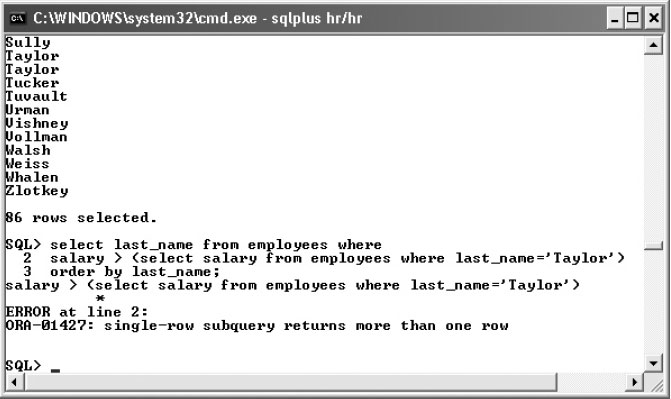
This will fail with the error "ORA-01427: single-row subquery returns more than one row." The following illustration shows the last few lines of the output from step 2 followed by step 3 and the error, executed with SQL*Plus.
-
Determine why the query in step 2 succeeded but failed in step 3. The answer lies in the state of the data:
select count(last_name) from employees where last_name='Tobias'; select count(last_name) from employees where last_name='Taylor';
The use of the "greater than" operator in the queries for steps 2 and 3 requires a single-row subquery, but the subquery used may return any number of rows, depending on the search predicate used.
-
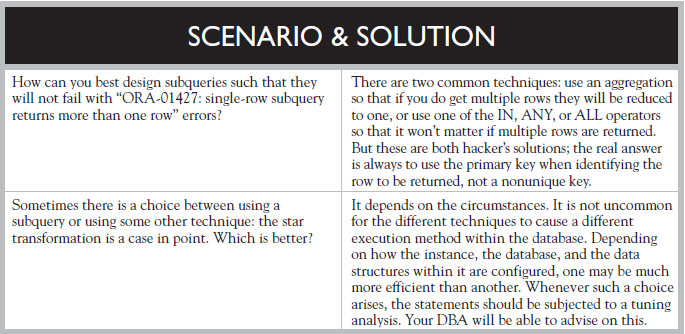
Fix the code in steps 2 and 3 so that the statements will succeed no matter what LAST_NAME is used. There are two possible solutions: one uses a different comparison operator that can handle a multiple-row subquery; the other uses a subquery that will always be single-row.
The first solution:
select last_name from employees where salary > all (select salary from employees where last_name='Taylor') order by last_name;
The second solution:
select last_name from employees where salary > (select max(salary) from employees where last_name='Taylor') order by last_name;
Download the chapter "Using Subqueries to Solve Problems", which includes practice exercises and a self-test, in PDF form.
Continue to the next section: Writing single-row and multiple-row subqueries