Oracle RMAN (Oracle Recovery Manager)
Oracle RMAN (Oracle Recovery Manager) is a utility built into Oracle databases to automate backup and recovery; it includes features not available in third-party backup tools. RMAN was introduced in Oracle release 8.0.
Database administrators (DBAs) can use RMAN to protect data on Oracle databases rather than requiring data backup administrators to initiate them.
An Oracle database client, RMAN automates administration of backup strategies and ensures database integrity. Block-level corruption detection is provided during backup and restore. Backup techniques such as parallelization of backup/restore data streams, a backup files retention policy and a detailed history of backup operations are supported.
Oracle RMAN handles the underlying maintenance tasks that must be performed before or after any database backup or recovery. It can conduct incremental backups, block media recovery, binary compression, encrypted backups, automated database duplication and cross-platform data conversion.
How RMAN works
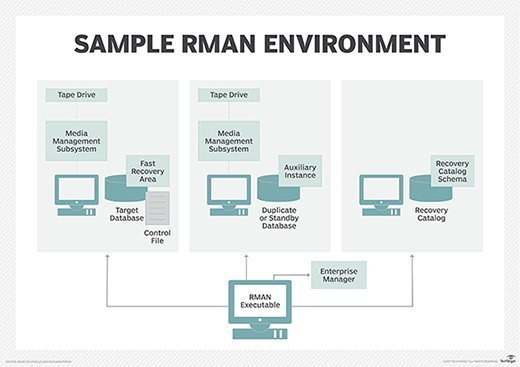
The RMAN environment must include a target database and the RMAN client. RMAN performs backups on the target database, and the client is the application that manages backup and recovery for the target database.
RMAN uses a media manager API to work with backup hardware. A user can log in to Oracle RMAN and command it to back up a database. RMAN will then copy the files to the directory specified by the user.
By default, RMAN creates backups on disk and generates backup sets rather than image copies. Backup sets can be written to disk or tape.
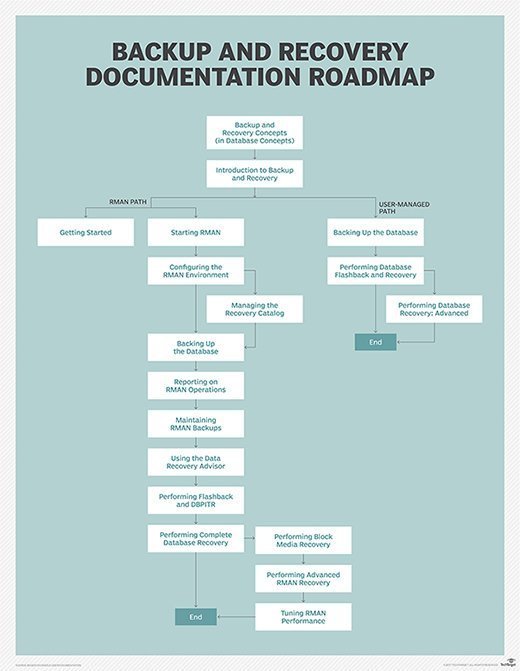
RMAN is the preferred method of backing up Oracle databases and is included with every copy of Oracle. However, RMAN isn't always required for Oracle backups. For example, it is possible to back up a cold database without using RMAN. A database that is not mounted can still be backed up at the file level without any database-level tools. Because RMAN was introduced in Oracle release 8.0, organizations with older database releases may not be able to use it.
RMAN backup commands allow DBAs to manage RMAN by typing a single word or short phrase. Commands are used to run a backup; convert data files; create, update and remove recovery catalog schemas; encrypt backups; initiate a flashback database; display a list of backup sets or copies; create a duplicate database; validate backup sets; and perform other tasks.
Important RMAN features
Backup sets. Oracle RMAN stores data in image files or backup sets, which are made up of backup pieces. A backup piece is an RMAN-specific binary file that only RMAN can create or restore. Backup pieces are grouped into a backup set, allowing DBAs to protect multiple data files, control files, server parameter files and archive logs together. RMAN can encrypt and decrypt data written to backup sets.
RMAN can also back up a copy of an image file. An image copy is an exact replica of a datafile, archive redo log file or control file. RMAN uses data sets by default, but DBAs can choose image copies through a command line.
Archived redo logs. Redo logs are another key piece of RMAN backup. A redo log stores all changes made to a database, and every Oracle database has an associated redo log. Groups of redo files can be saved off-site in an archived redo log. Archived redo logs allow restoration of a database from an inconsistent backup, which occurs when the database does not shut down normally. An inconsistent backup allows backups to occur when the database is open. Oracle RMAN can also conduct consistent backups, which occur after a database is shut down normally. A consistent backup does not require media recovery to restore the database.
Flash recovery. RMAN backups are created in the Oracle database flash recovery area (FRA) on disk. The FRA is a directory that contains online and archived redo logs, flashback logs, control files and image copies. When disk space is required for new backups, the Oracle database removes backups that are no longer needed to make room. A DBA sets policies to determine which FRA files are obsolete and can be safely deleted. Files that have been moved to tape are also candidates for removal when disk space is needed. Using a flash recovery area can save time because a DBA does not have to manually delete files to make room for new backups.
RMAN Oracle Flashback Database and Media Recovery. RMAN can restore data through Oracle Flashbacks or Media Recovery. Flashbacks enable point-in-time recovery that allows DBAs to go back to a previous time, and is used for data corruptions and user errors.
Media Recovery is used to correct media failures. Archived media files and online redo logs can update data files so they can be restored. Datafile Media Recovery can recover a single lost or damaged file; Block Media Recovery can restore a few blocks of data while the database files remain available.
Flashback Database, added in Oracle 10g, allows RMAN to restore an entire database to any point in time instead of performing an incomplete recovery. This point-in-time recovery uses a Recovery Writer background process to copy changed blocks from the database buffer cache to a flashback buffer, then copies changes to flashback logs. Restoring with Flashback Database could have a small performance overhead; it is faster than first restoring data files, which is how incomplete recovery works. Flashback Database cannot recover from deletions of individual files or repair disk or tape errors; it can only recover from changes to data files made by the Oracle database.
Encrypting Backup Sets. RMAN includes three encryption modes: Transparent Encryption, Password Encryption and Dual Mode Encryption. Transparent Encryption uses an Oracle software keystore, which is a password-protected container called a wallet, to store a Transparent Data Encryption (TDE) key. The TDE enables creation and restoration of encrypted backups with no database administrator involvement. The Password Encryption and Dual Mode Encryption modes can be restored with keystore or a password.
Oracle Database 12c Release 2 rolled out in September 2016 with new RMAN features. They include the ability to perform a Flashback Database to rewind a pluggable database to a point in time, recovery of non-logged data blocks by fetching them from the primary or standby database, recovery of tables or table partitions to a different schema, enhancements to the duplicate command and cross-platform transports, and backup and recovery of sparse databases.