How to view and edit table column definitions
In this chapter, learn how to edit and view column names and column definitions for a table, and when to use SQL Developer to do so.
 |
|
 |
|
|
|
This chapter from Murach's Oracle SQL and PL/SQL explains how to work with Oracle SQL Developer and other tools. In this section, learn more about table column definitions, including how to edit and view column names and column definitions for a table, and when to use SQL Developer.
Table of contents:
 How to work with an Oracle database home page
How to use SQL*Plus in Oracle
How to use SQL Developer to work with an Oracle database
How to view and edit table column definitions
How to use SQL Developer to run SQL statements
How to use the Oracle Database SQL Reference manual

How to view the column definitions for a table
To view the column names for a table, you can expand the node for the table. In figure 2-6, for example, I expanded the node for the Vendors table so the names for all of columns in the table are displayed below the table.
|
||||
|
|
|||
|
||||
How to view the data for a table
To view the data for a table, you just click on the Data tab after you display the column definitions for the table. By switching back and forth between the Column and Data tabs, you can quickly see how the data corresponds to the data definitions.
You can also use the Data tab to modify the data in a row, and you can use the Insert and Delete buttons at the start of this tab to add rows or delete rows. Then, if you want to commit the changes to the table, you can click on the Commit Changes button. Or, if you want to rollback the changes, you can click on the Rollback Changes button. In chapter 7, you'll learn more about committing and rolling back changes.
How to view the column definitions for a table
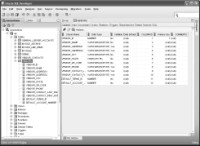
Figure 2-6 How to view the column definitions and data for a table
How to view the column definitions for a table
- To view the column names for a table, expand the Tables node and then expand the node for the table you wish to view. This displays the columns in the Connections window.
- To view the column definitions for a table, click on the name of the table in the Connections window. This displays detailed information about the columns of the table in the window to the right of the Connections window.
- By default, the columns are displayed in the sequence in which they were created.
- Click on the Data tab in the window that's displaying the column definitions for the table.
If you want to edit a column definition, you can use one of the techniques described in figure 2-7 to display the Edit Table dialog box. Then, you can use this dialog box to add a column, delete a column, or modify a column.
If you want to display additional information about a column, you can select the column by clicking on it. Then, additional properties are displayed in the Column Properties group that's displayed on the right side of the dialog box. In this figure, for example, the properties for the DefaultTermsID column are displayed. In addition, a default value of 3 has been entered for this column. Note that the properties that are available change depending on the data type of the column. For a column with the VARCHAR2 data type, for example, the properties also indicate the length of the column. You'll learn more about that in chapter 8.
Most of the time, you won't want to use SQL Developer to edit the column definitions for a table. Instead, you'll want to edit the scripts that create the database so you can easily recreate the database later. However, if necessary, you can use SQL Developer to edit the column definitions for a table. In chapter 10, you'll learn more about creating and modifying the column definitions for a table.
How to edit the column definition of a table

Figure 2-7 How to edit the column definitions
Description
- To edit the definition of a table, right-click on the table name, select the Edit command, and use the Edit Table dialog box to modify the table.
- You can use the Edit Table dialog box to add a column, delete a column, or change the properties of an existing column such as the name, data type, default value, and so on.
- You can also use the Edit Table dialog box to add, delete, or modify a table-level constraint, an index, or a table-level comment.
- For more information about creating tables, see chapter 10.
Download the chapter "How to use Oracle SQL Developer and other tools" in PDF form.
Continue to the next section: How to use SQL Developer to run SQL statements